View Interior
As of TARDIS v4.11.0 you can view the interior of the TARDIS through the open Chameleon preset door). This feature is currently a work in progress.
The Chameleon preset must be one with an actual door block, not a trapdoor or one of the coloured item frame / armour stand Police Boxes.
To enable/disable the viewing of interiors:
- use the command
/tardisconfig view_interior [true|false]
There are two other config options:
policebox.view_interior.type: [maps|packets], if set topacketsthen you will see the blocks behind the door change.policebox.view_interior.use_console_size: [true|false], iftruethis sets the view distance to the size of the TARDIS interior rather than the default 16 blocks.
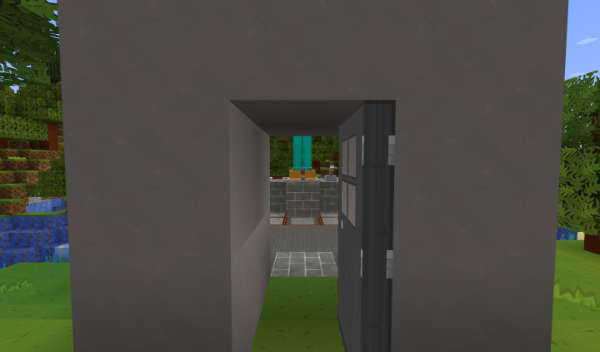
When you open your exterior TARDIS door, you will see the interior features of your TARDIS.
Alternative interior `view
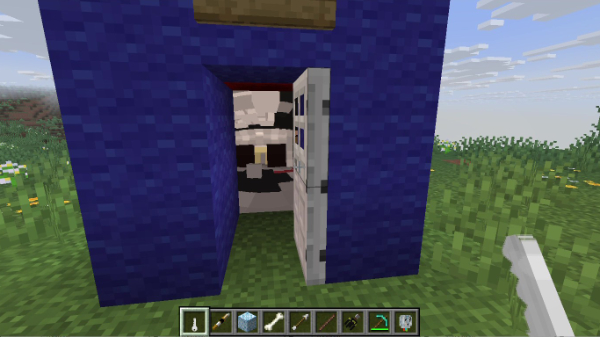
You can change the way that interior views are displayed to use custom images on maps. See the type config option below - if set to maps the bigger on the inside effect looks like this:
Config options
| Config | Type | Default |
|---|---|---|
police_box: | ||
view_interior: | ||
enabled | boolean | false |
| Sets whether player’s can view the TARDIS interior when opening the exterior TARDIS door. | ||
type | string | maps |
Whether to use two maps in item frames, or send block change packets | ||
use_console_size | boolean | false |
Sets whether the the interior view distance uses the interior console size or a default 16 blocks - only used if type is set to packets | ||